Forge Save + ForgeFlow Recipe Viewer: Preserving Generation Data in ComfyUI Production Workflows
AI image and video generation is fast, but production handovers are still messy. Once an asset leaves ComfyUI and moves into Photoshop, After Effects, Premiere, client review, or another artist’s hands, the generation data that created it is often separated from the final output.
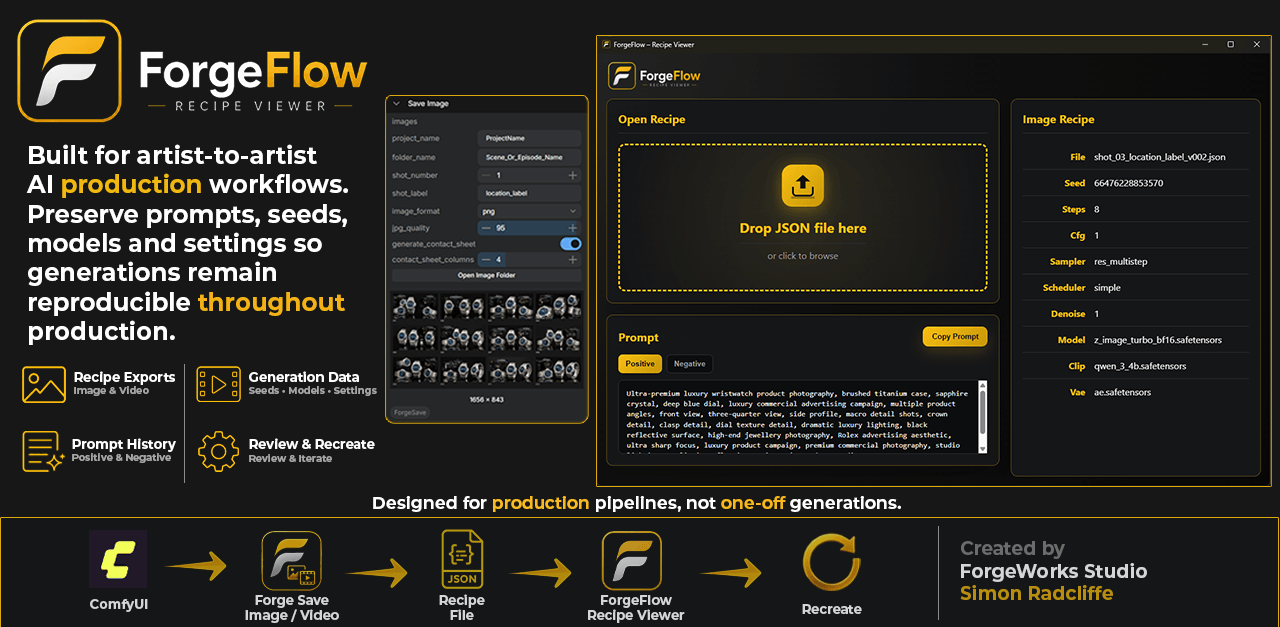
AI assets often go through Photoshop, After Effects, Premiere and multiple artist handovers before delivery. During that process, prompts, seeds, models and generation settings frequently become separated from the final asset, making revisions and future iterations far more difficult than they need to be.
The Production Problem
In a real production environment, an AI-generated image or video rarely stays untouched. An artist may generate an asset in ComfyUI, then take it into Photoshop for retouching, After Effects for animation, Premiere for editing, or another pipeline stage for finishing.
By the time that asset is passed to another artist, producer, client, or future version of the project, the image may still exist, but the generation context is often missing.
- The prompt is missing.
- The negative prompt is missing.
- The seed is unknown.
- The model version is unclear.
- The sampler, scheduler and generation settings are not documented.
- The original artist may no longer remember exactly how the asset was created.
This creates unnecessary friction during revisions, localisation, upscaling, client feedback, and artist-to-artist handovers. A simple change request can become detective work.
Why I Built These Tools
Forge Save and ForgeFlow Recipe Viewer were built to address that production problem. The goal is not to create another generation tool. The goal is to keep useful generation data attached to the work, so artists and production teams can understand, revisit and recreate previous outputs more easily.
These tools are designed for artist-to-artist AI production workflows where metadata, reproducibility and consistent handovers matter.
Forge Save Image and Forge Save Video
Forge Save provides ComfyUI save nodes for structured image and video output. Instead of simply exporting a file into a generic output folder, Forge Save helps organise generations into production-friendly project folders and can save a companion recipe JSON file alongside each output.
The recipe export captures key generation information at the point of saving, including prompts, seeds, model information and other relevant settings where available.
Forge Save helps with:
- Structured project and shot-based output folders.
- Automatic versioned image and video saving.
- Recipe JSON exports for generated assets.
- Keeping generation data closer to the exported image or video.
- Improving handovers between artists and production stages.
ForgeFlow Recipe Viewer
ForgeFlow Recipe Viewer is a lightweight desktop application for opening and inspecting the recipe JSON files created by Forge Save.
Instead of manually opening JSON files, artists can drag and drop a recipe into ForgeFlow Recipe Viewer and quickly review the important generation data in a cleaner interface.
ForgeFlow Recipe Viewer supports:
- Image recipe JSON files.
- Video recipe JSON files.
- Positive prompt viewing.
- Negative prompt viewing.
- Prompt tab switching.
- Copy prompt functionality.
- Recipe metadata inspection.
- Windows installer and portable EXE releases.

A Simple Production Workflow
- An artist generates an image or video in ComfyUI.
- Forge Save exports the image or video into a structured project folder.
- Forge Save writes a recipe JSON file alongside the output.
- The asset can move into post-production, review or delivery.
- Another artist can later open the recipe in ForgeFlow Recipe Viewer.
- The prompt, seed, model and settings can be reviewed without digging through old workflows.
This does not remove the need for good production discipline, but it helps automate one of the most commonly missed steps: keeping useful generation metadata close to the generated asset.
Who This Is For
These tools are mainly aimed at AI artists, ComfyUI users, technical artists, creative technologists and small production teams working with generated image or video assets.
They are especially useful when multiple artists need to work from the same generations, revisit old outputs, create variations, or understand how an asset was originally created after post-production has taken place.
Download and Repositories
ForgeFlow Recipe Viewer is available as a Windows installer and portable executable from GitHub Releases.
Download ForgeFlow Recipe Viewer