A Desktop Tool for Faster Image WorkflowsOver the past few weeks I’ve been building and releasing a new desktop application called ImageForge Optimiser.
What started as a small workflow utility evolved into a fully packaged Windows application with a public GitHub repository, downloadable releases and an ongoing development roadmap.
Working across CGI, AI-generated imagery, portfolio production and web content means dealing with large batches of images on a regular basis. Exporting, converting formats, reducing file sizes and organising outputs quickly becomes repetitive, so I decided to build a tool that simplified the process.
The goal wasn’t to create another feature-heavy image editor. Instead, I wanted a lightweight application focused on one task: reducing image file sizes quickly while supporting modern image formats and batch workflows.
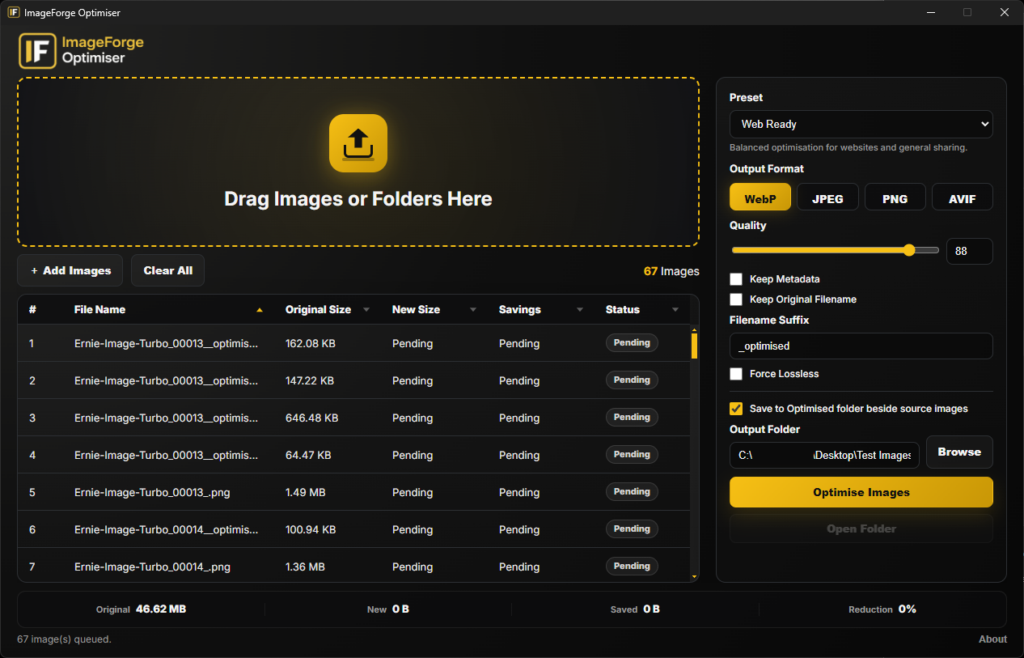
ImageForge Optimiser was built using Electron, Sharp, JavaScript, HTML and CSS. The application supports PNG, JPEG, WebP and AVIF formats and allows users to drag and drop either individual images or entire folders for processing.
One of the most useful features to come out of development was the automatic creation of an Optimised folder beside the source images. Rather than constantly browsing for output locations, users can simply drop files into the application and let the workflow handle the organisation automatically.
Current features include:
Building the application itself was only part of the project. Packaging, documentation, versioning, testing and release management all played an equally important role in turning an internal utility into a public software release.
For me, projects like this represent the intersection of software development, creative production and workflow design. Identifying repetitive tasks and creating practical tools to solve them is one of the most rewarding aspects of being a Creative Technologist.
ImageForge Optimiser is now available as a public release and joins a growing collection of tools and workflow solutions that I have developed to support creative production pipelines.
The goal wasn’t to create another feature-heavy image editor. Instead, I wanted a lightweight application focused on one task: reducing image file sizes quickly while supporting modern image formats and batch workflows.
ImageForge Optimiser was built using Electron, Sharp, JavaScript, HTML and CSS. The application supports PNG, JPEG, WebP and AVIF formats and allows users to drag and drop either individual images or entire folders for processing.
One of the most useful features to come out of development was the automatic creation of an Optimised folder beside the source images. Rather than constantly browsing for output locations, users can simply drop files into the application and let the workflow handle the organisation automatically.
Current Features
- Drag & drop images
- Drag & drop folders
- Recursive folder scanning
- Batch image optimisation
- Smart output folders
- PNG, JPEG, WebP and AVIF export
- Portable Windows release
Building the application itself was only part of the project. Packaging, documentation, versioning, testing and release management all played an equally important role in turning an internal utility into a public software release.
For me, projects like this represent the intersection of software development, creative production and workflow design. Identifying repetitive tasks and creating practical tools to solve them is one of the most rewarding aspects of being a Creative Technologist.
ImageForge Optimiser is now available as a public release and joins a growing collection of tools and workflow solutions that I have developed to support creative production pipelines.
Links
GitHub Repository
https://github.com/SRadcliffe/imageforge-optimiser
Latest Release
https://github.com/SRadcliffe/imageforge-optimiser/releases